

A virtual executive assistant (virtual EA) is a remote professional who takes over the administrative and organizational load that sits between you and your real work: your inbox, calendar, projects, follow-ups and the systems that hold them together. The role works best when it covers more than errands. The person who runs your operations, not just your to-do list, is the one who gives you back your week. That is how we approach it at AlyBCo: operational and administrative support built around how your business actually runs.
This guide explains what a virtual EA does, how the role differs from a general virtual assistant, what to hand off first, and how to set up the working relationship so it holds up past the first month.
TL;DR
-
A virtual EA is a remote professional who manages your calendar, inbox, projects and follow-ups, so you spend your time on decisions and growth.
-
Unlike a task-based virtual assistant, an EA-level role owns outcomes and keeps work moving without you chasing it.
-
Delegate by defining the outcome, the authority, the limits and the point at which the assistant must come back to you.
-
Systems matter as much as people: documented processes and a project tool such as ClickUp or Asana keep the help sustainable.
-
Agree on priorities, a weekly check-in and a single place where work is tracked before the first task is handed over.
Table of Contents
What a virtual executive assistant actually is
The title borrows from the traditional executive assistant, the person who sits near a senior leader and keeps their day functioning. The “virtual” part means the work happens remotely, through email, shared calendars, messaging, video calls and project software, rather than from a desk down the hall.
For a founder or owner of a small or mid-sized company, the role usually looks like this: one person who knows your priorities, your clients and your preferences, and who handles the administrative and coordination work so it stops landing on you at 9 p.m. People also search for it as a “virtual EA”. It is the same role.
Two things define it:
-
Proximity to decisions. The assistant understands what you are trying to achieve, so they can act on your behalf in routine matters and flag the ones that need you.
-
Ownership. You hand over a result (“the client onboarding runs smoothly”), not just a single action (“send this email”).
How a virtual EA differs from a general virtual assistant
The two terms overlap, and plenty of people use them interchangeably. In practice the difference is scope and ownership.
| General virtual assistant | Virtual executive assistant | |
|---|---|---|
| Typical work | Discrete tasks: data entry, research, formatting, posting | Ongoing responsibilities: calendar, inbox, projects, follow-ups |
| How you work together | You assign, they complete | You set direction, they run it and report |
| Judgment | Follows instructions | Makes decisions within agreed limits |
| Systems | Uses yours | Often helps build and maintain them |
| Best for | Overflow and one-off jobs | Owners who need a steady operational partner |
Neither is better in the abstract. A task-based helper fits a clear, repeatable list. If your problem is that everything flows through you, and nothing moves unless you push it, you need the second model.
What a virtual executive assistant can handle
The work falls into a few groups. The mix depends on your business, but most owners start with the first two.
Inbox, calendar and scheduling
This is the classic entry point. Sorting email, drafting replies for your review, booking meetings, protecting focus time and managing reschedules take hours each week. A typical owner loses more time to the back-and-forth of scheduling than to the meetings themselves. A good assistant sets rules once (which meetings you accept, which days stay clear, which senders get priority) and applies them consistently.
Client coordination and CRM upkeep
Following up with leads, confirming appointments, sending onboarding materials and keeping contact records current are all work that quietly drops when you are busy. Dropped follow-ups are lost revenue. Keeping your CRM (the database where you track leads and clients) accurate means you can see who needs attention without rebuilding the picture from your inbox.
Project coordination and timeline management
Someone has to know what is due, who is waiting on whom and what is slipping. Project coordination means tracking deadlines, nudging contributors, running status updates and keeping launches on schedule. Accountability tracking, where tasks have an owner and a date and someone confirms they were done, is the part most small businesses skip, and the part that makes the biggest difference.
Documentation and processes
When your business runs on what is in your head, you cannot delegate it. An SOP (standard operating procedure) is a written, step-by-step description of how a recurring task is done. Documenting SOPs turns “how we do things” into something that survives a vacation, a new hire or a change of assistant.
Launch and special-project support
Product launches, program rollouts, events and rebrands generate bursts of coordination: checklists, deadlines, handoffs, last-minute fixes. An assistant who already knows your tools and team can absorb that surge instead of you doing it on top of everything else.
How the remote working relationship works
Remote support is less mysterious than it sounds. A typical setup has four parts.
-
Shared access. You give the assistant access to the tools the work needs: email, calendar, project software, CRM and shared documents, ideally through delegated permissions rather than shared passwords.
-
A home for tasks. Work is tracked in one project tool, not scattered across texts and sticky notes. This is where ClickUp or Asana come in: a board or list where each task has an owner, a due date and a status.
-
A rhythm. A short weekly check-in, plus an agreed way to reach each other for urgent items, replaces constant interruptions.
-
A written record. Instructions, preferences and recurring procedures live in documents, so the work does not depend on anyone’s memory.
What makes remote work succeed is clarity, not proximity. The more explicit the outcomes and handoffs are, the less supervision the arrangement needs.
What to delegate first
Most owners hesitate to delegate because they are not sure where to begin, or fear losing control. A structured way to decide helps. One published guide on this suggests separating what the assistant can execute, what they can decide within guardrails, what they must escalate and what you keep. It also suggests defining, for each delegated workflow, the outcome, the authority, the guardrails, the escalation triggers and the system that holds the source of truth.
Here is how to apply that in practice.
Step 1: List what drains your week
For one week, note every task that is administrative, repetitive or coordination-heavy. Include the small things: rescheduling, chasing replies, copying details between systems. You will usually find the same handful of categories repeating.
Step 2: Sort into four buckets
-
Hand off completely. Tasks with clear rules: scheduling, receipts, routine replies, data entry, meeting notes.
-
Hand off with limits. Tasks that need judgment up to a point: “approve vendor invoices under $500” or “reschedule any meeting except with these three clients.”
-
Hand off with escalation. Tasks the assistant prepares and you decide: a pricing exception, a complaint, a hiring choice.
-
Keep. Strategy, relationships only you can hold, and decisions tied to your risk or your name.
Step 3: Write the outcome, not the steps
“Keep my calendar clear on Fridays” is an outcome. “Decline requests on Fridays” is a step. Outcomes let the assistant adapt when something unusual comes up, and they make it obvious when the work has gone wrong.
Step 4: Define what triggers a call to you
Escalation rules prevent both silence and over-asking. Examples: any client mention of canceling, any spend above a set amount, any legal or tax question, any scheduling conflict involving the board. Write them down once.
Step 5: Name the source of truth
Decide where each kind of information lives: the CRM for client details, the project tool for deadlines, a shared folder for documents. When two places hold the same fact, they eventually disagree.
Skills and tools to look for
The skills that matter most are rarely the flashy ones.
-
Written communication. Clear, concise updates that tell you what was done, what is blocked and what needs your decision.
-
Prioritization. The ability to tell what is urgent from what is merely loud.
-
Discretion. Access to your inbox and client data requires trustworthiness and sound habits about confidentiality.
-
Systems thinking. Spotting that the same problem recurs and fixing the process, not just the instance.
-
Tool fluency. Comfort with a project management platform, calendar tools, a CRM, shared documents and video meetings.
Of these, systems thinking separates a helpful assistant from a lasting one. An assistant who only clears tasks keeps you dependent on them. One who documents and streamlines what they touch leaves your business easier to run.
Setting priorities, routines and expectations
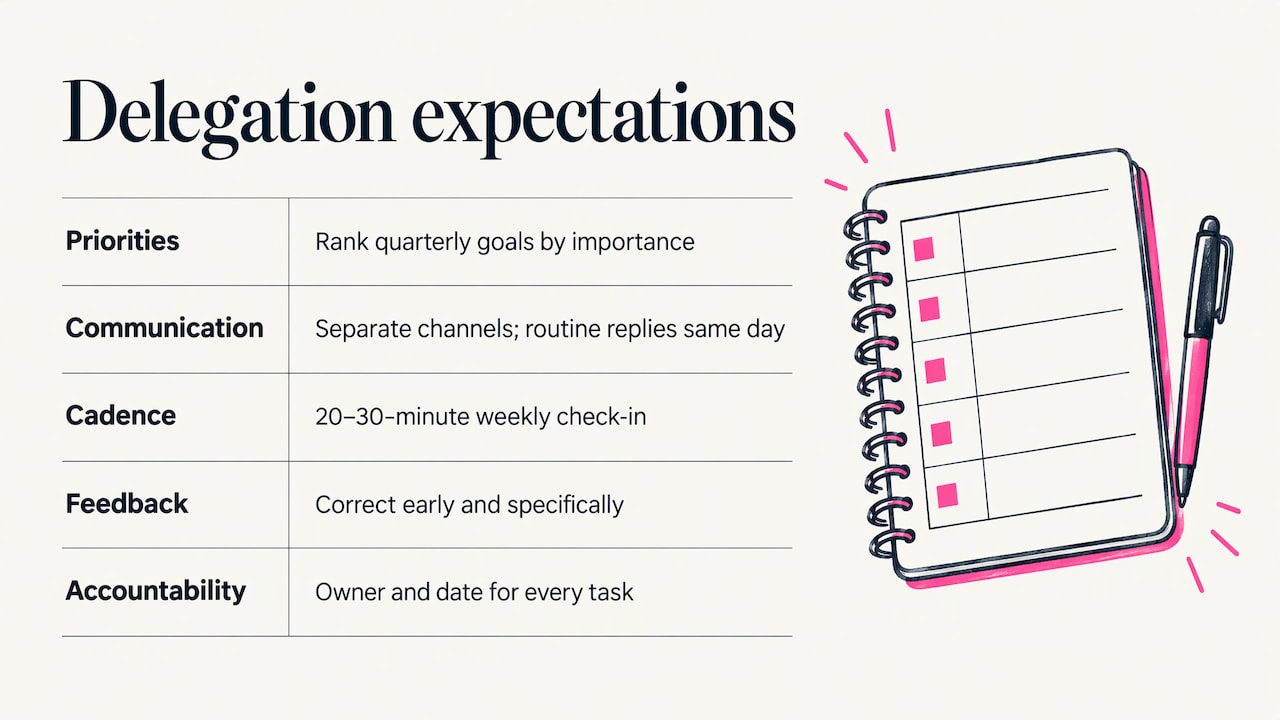
Most delegation problems are expectation problems. Settle these before week one.
Priorities. Give the assistant a short ranked list of what matters this quarter (for example: protect client delivery, then sales follow-up, then internal admin). When two things collide, they will know which wins.
Communication. Pick one channel for routine requests and one for urgent ones. Agree on response times, such as same business day for routine items, and what “urgent” means.
Cadence. A 20 to 30 minute weekly check-in covers what was completed, what is in progress, what is stuck and what is coming. A brief end-of-day or end-of-week written summary keeps you informed without a meeting.
Feedback. Correct early and specifically. “Next time, offer two time slots, not an open calendar” is far more useful than a general sense of dissatisfaction, and it becomes a standing rule.
Accountability. Every task has an owner and a date. When something slips, the question is what in the process allowed it, not who is to blame.
What it costs, and why scope matters more than rate
Pricing varies widely, so it helps to know the wider labor market. The U.S. Bureau of Labor Statistics reports a median pay of $48,310 per year for secretaries and administrative assistants in 2025, which gives a baseline for what administrative work costs before you add benefits, equipment, management time and recruiting. A remote arrangement spares you most of that overhead.
Still, the hourly rate is the wrong number to compare. Two questions matter more:
-
How many of your hours does it return each week, and what are those hours worth?
-
Does the support leave you with documented systems, or only with completed tasks?
A lower rate that requires heavy supervision costs more than a higher one that runs on its own.
Common mistakes when working with a virtual EA
-
Delegating a mess. If a process is unclear to you, it will be unclear to anyone. Document it first, even roughly.
-
Handing over tasks but not context. Explain why a client matters or why a deadline is firm, and decisions improve.
-
Staying the bottleneck. If everything still waits for your approval, you have moved the work, not the burden. Set limits that let the assistant act.
-
Skipping the check-in. Small misunderstandings grow quickly when nobody talks weekly.
-
Using too many tools. Each additional app is another place work can hide. Consolidate.
How AlyBCo supports owners
Our work covers the practical areas this guide describes. Under Operations Support, Systems & Processes, Project Management and Administrative Support, we handle backend organization, workflow management, ClickUp and Asana setup, SOP creation, process improvement, project coordination, accountability tracking, launch support, timeline management, inbox and scheduling support, documentation, client coordination and CRM management.
Our approach is human-centered: support is customized to each business’s needs and workflow, with systems designed to be clear and sustainable, so the help you get is dependable and the structure stays useful for you and your team. We have experience across industries and platforms, and we adapt to the tools you already use.

If you are ready to hand off the daily chaos and build something steadier, start at AlyBCo.
Where this leaves you
A virtual executive assistant is most valuable when you treat the role as operational ownership, not an extra pair of hands. Decide what you will keep, define the outcome and limits for everything else, give the work one home, and meet weekly. Do that and the benefit is not only fewer tasks on your plate. It is a business that no longer depends on you remembering everything.
FAQ
What is a virtual EA?
A virtual EA is a virtual executive assistant: a remote professional who manages administrative and organizational work such as email, scheduling, projects and follow-ups for an owner or executive. The terms mean the same thing. The “executive” label signals ongoing ownership of responsibilities rather than one-off tasks.
Is a virtual executive assistant the same as a virtual assistant?
Not quite. A general virtual assistant typically completes individual tasks you assign. A virtual executive assistant manages recurring responsibilities, makes decisions within limits you set and often helps build the systems the work runs on.
What should I delegate to a virtual executive assistant first?
Start with work that is repetitive and rule-based: scheduling, inbox sorting, meeting notes, client follow-ups and project status tracking. Once that runs smoothly, add work that needs judgment within limits, such as approvals under a set amount, and keep strategic decisions and key relationships for yourself.
How do I work with a virtual executive assistant day to day?
Give them access to your calendar, inbox and project tool, agree on one channel for routine requests and another for urgent ones, and hold a short weekly check-in. Track all work in a single project tool so you can see status without asking.